907.【Generative AI】 Creating Fun “Tech Stack Promo Images”
GitHub × Pages × Mermaid × LaTeX × Python × VSCode (Prompt Collection)
topics: [“GenerativeAI”, “PromptEngineering”, “GitHub”, “GitHubPages”, “Mermaid”, “LaTeX”, “Python”, “VSCode”]
🎯 Purpose of this article
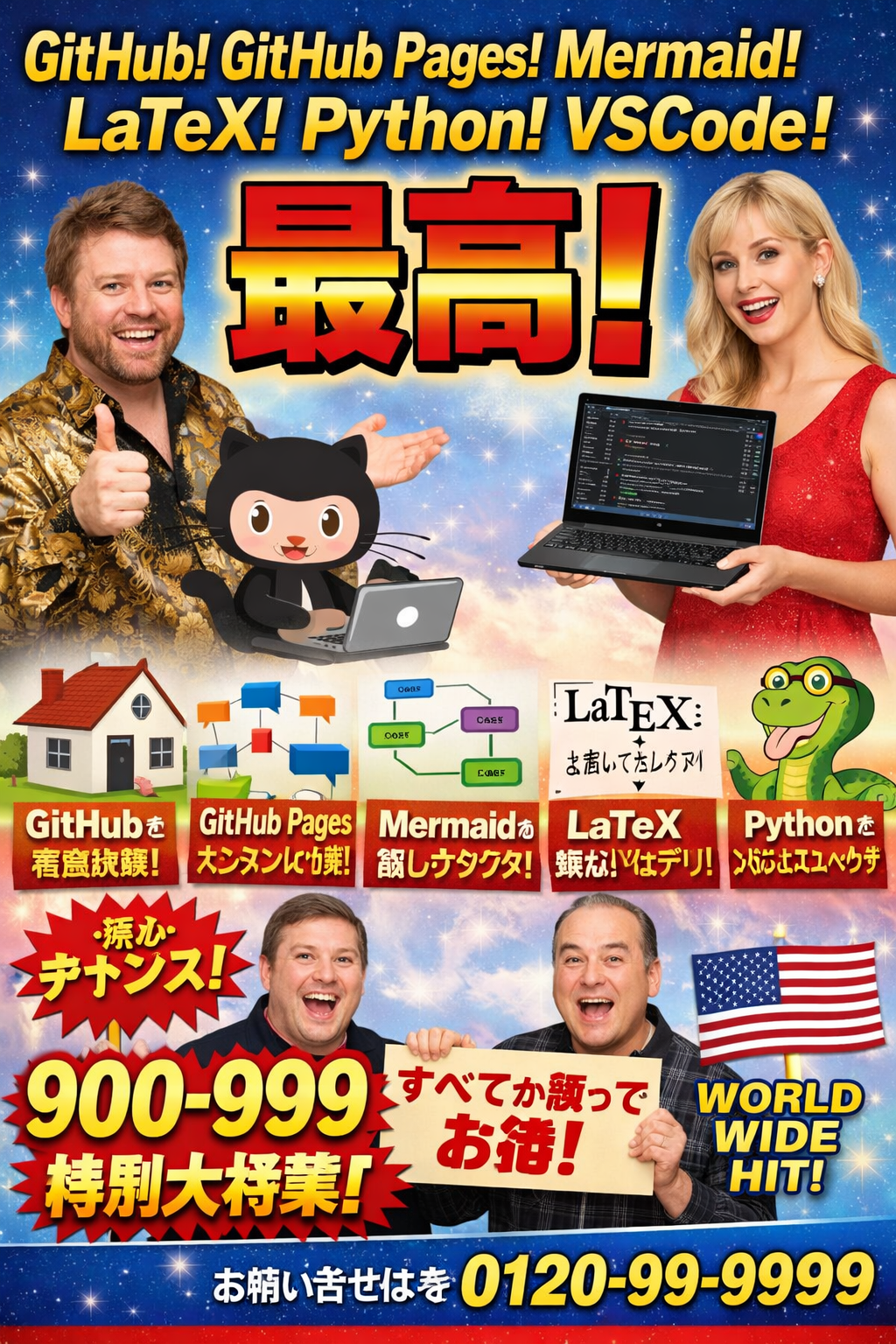
This image is intentionally generated with an over-the-top advertisement tone
to promote a developer tech stack.
This article explains how to create similar fun and memorable promo images
using generative AI, by sharing copy-and-paste-ready prompts.
- English prompts only
- Optimized for global / overseas audiences 🌍
- Focused on practical reuse, not theory
⚡ Quick usage
- Open any text-to-image generative AI tool
- Paste the prompt below
- Check the output and adjust:
- text amount
- number of elements
- spelling errors
- Generate 2–5 times and pick the best result
One-shot perfection is rare.
🧠 Base prompt (English)
Goal: generate an intentionally exaggerated tech-stack promo poster
A humorous, high-impact promo poster for developers, styled like a retro Japanese TV infomercial.
Main headline: “GitHub! GitHub Pages! Mermaid! LaTeX! Python! VSCode!”
Big central punch text in Japanese: “最高!” (meaning “the best!”)
Vibrant gradients, bold outlines, sparkly background, dramatic lighting, exaggerated excitement.
Include playful icon-like visuals representing: GitHub (octocat), a website/page for GitHub Pages, a flowchart for Mermaid, a math formula card for LaTeX, a python mascot, and a code editor laptop for VSCode.
Composition: large headline on top, huge punch word in the center, small feature panels at the bottom.
Make it look like an energetic advertisement poster, comedic but readable.
Avoid real brand logos that are too exact; use generic look-alike icons.
High resolution, sharp text, poster layout, no watermark.
🧩 Prompt modifiers (drop-in variants)
🌍 1) Stronger global appeal
Add a bold English badge: “WORLDWIDE HIT!”
Add a tagline: “All-in-One Docs + Diagrams + Math + Code”
Make typography mostly English, with one big Japanese punch word “最高!”
✂ 2) Reduce text for stability
Reduce all small texts.
Keep only the main headline, the big “最高!”, and one short English tagline.
Remove tiny captions and phone-number-like elements.
💻 3) More “developer tools” feeling
Add more developer gear: laptop, terminal window, code snippets, diagram cards.
Use fewer characters and larger icons.
Keep spacing wide and clean.
🎨 4) Background variations (for series)
Change background to: neon cyberpunk / minimal white studio / comic halftone / space nebula.
Keep the same headline and layout style.
⚠ Common failures & how to avoid them
| Problem | Fix |
|---|---|
| Typos in text | Reduce small text |
| Too noisy | Fewer elements |
| Broken logos | Avoid exact brand logos |
| Low readability | Limit text to 3 areas |
🔤 Text stability rule
- The more small text, the more errors
- Start with only:
- headline
- punch word
- tagline
This gives the highest success rate.
🧪 Minimal prompt (short version)
Retro Japanese TV infomercial style developer promo poster.
Headline: “GitHub! GitHub Pages! Mermaid! LaTeX! Python! VSCode!”
Huge Japanese punch word: “最高!”
Sparkly background, bold gradient typography, comedic ad layout.
Include generic icons for website, flowchart, math, python, code editor.
High resolution, poster composition, no watermark.
✅ Summary
- 🎯 Fun promo images improve memory retention
- ✂ Less text = higher success rate
- 🔁 Prompt variants enable easy mass production
- 📈 If it works, expand as a series (908, 909…)
Generative AI is useful not only for building tech,
but also for presenting it.