06.【FCMD】 FreeCAD Without GUI Operations
— Generating Geometric Solids Using Only Function Definitions
tags: FreeCAD, CAD, Python, Mechanical Design, Mathematics
Introduction
FreeCAD is widely known as a parametric CAD tool.
However, far fewer people realize that:
Purely with Python code —
without sketches, constraints, or GUI operations —
FreeCAD can generate highly complex geometric solids.
In this article, I introduce fully code-driven solid models created with:
- No sketches
- No Part Design
- Almost zero GUI operations
Everything shown here is generated only by Python code.
First, Look at the Final Result
Function-Defined Loft with Twist
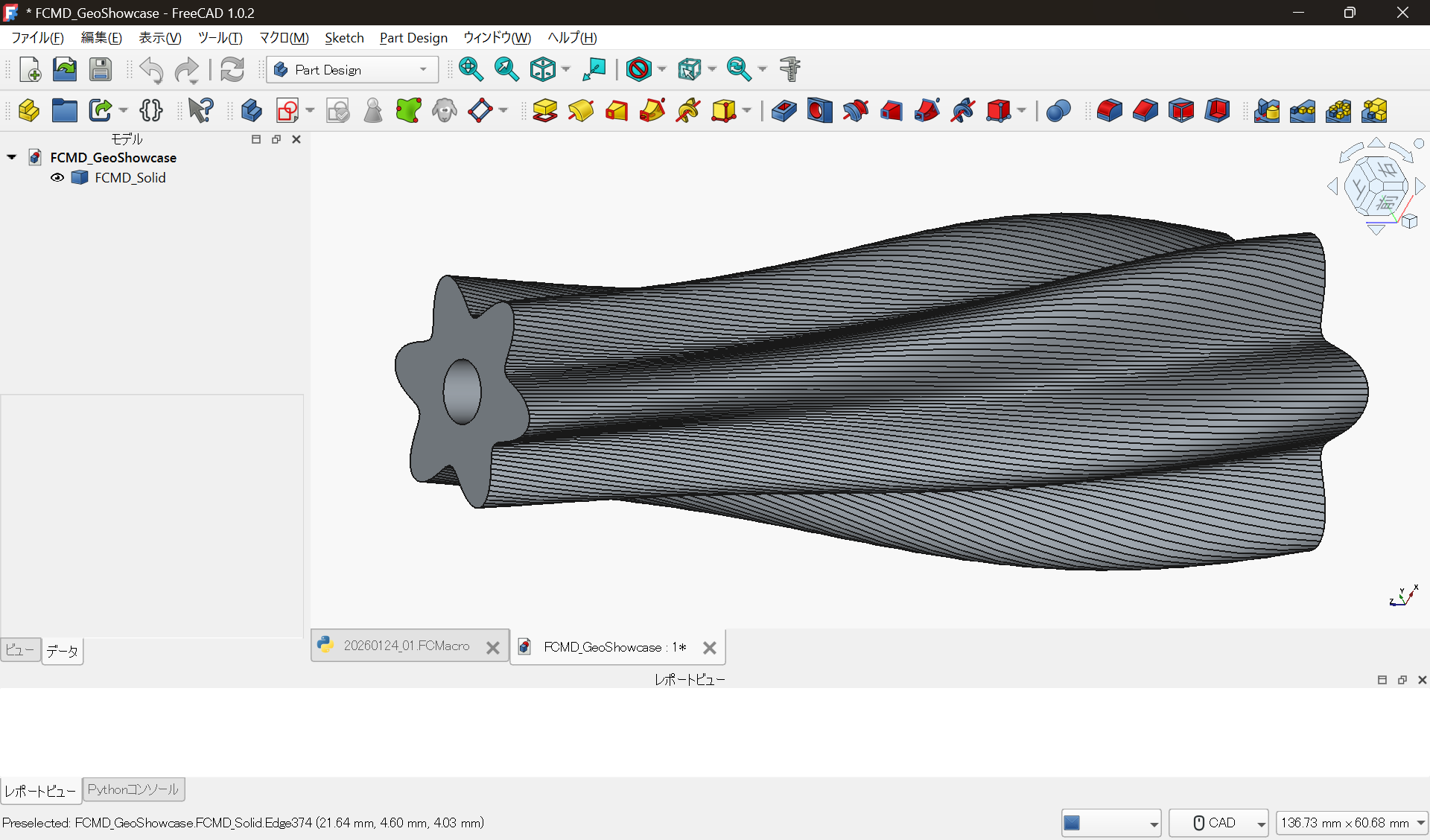
This solid is generated by:
- Defining the radius as a function $r(z)$
- Modulating the cross-section using periodic functions
- Stacking sections along the z-axis and Lofting
- Applying an additional twist transformation
Every step is implemented entirely in Python.
No sketches.
No constraints.
Another Example: A Branched Spiral Solid
Next is a shape that most people would not even attempt to build via GUI.
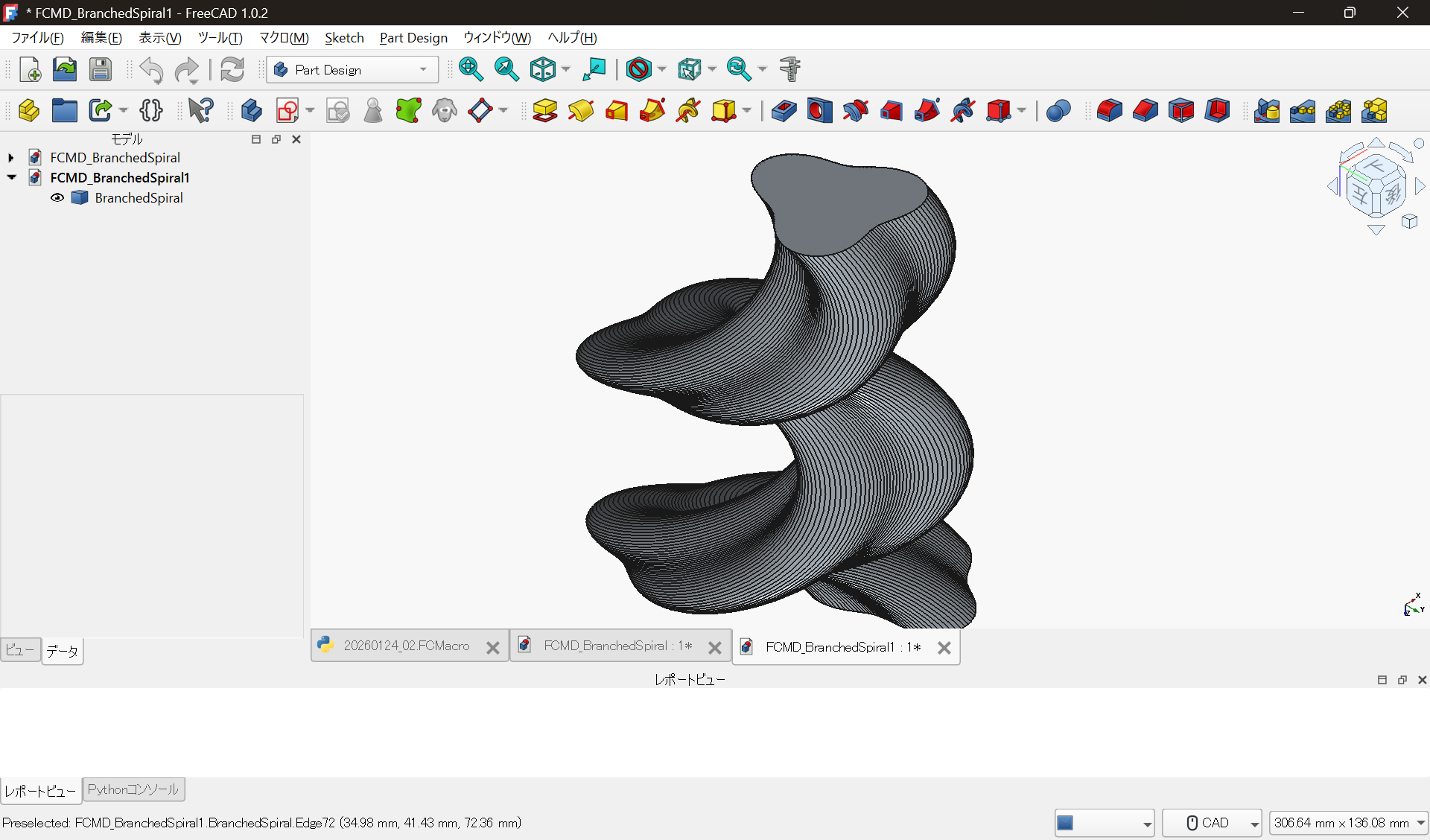
This model is created by:
- Generating spatial curves (spirals) via code
- Defining cross-sections as functions
- Introducing phase jumps to create branches
- Converting the result into a solid via sweep/loft logic
Because the geometric characteristics change mid-structure,
this type of model is particularly fragile in GUI-based history trees.
What Actually Matters Here
The key point is not that the shapes look unusual.
Geometry as the Result of Rules
In these examples, properties such as:
- Dimensions
- Wave amplitude
- Twist amount
- Branch locations
are all defined as variables and functions in Python.
In other words:
Geometry ≠ result of manual operations
Geometry = execution result of rules
The Decisive Difference from GUI CAD
Trying to achieve the same result with GUI CAD typically leads to:
- Exploding sketch counts
- Fragile constraints
- Loss of design intent
With code-based design, you instead write:
def r(z):
    return base + amp * math.sin(freq * z)
Here, the design intent itself remains explicitly visible.
Change the numbers.
Re-run the code.
The design updates.
Why This Is Useful in Real Work
This approach is not limited to artistic modeling.
It is extremely effective for:
- Special-purpose shafts
- Mixing and stirring geometries
- Cooling fins
- Experimental jigs and fixtures
- Parameter-space exploration
Anywhere you want to control shape by rules,
code-based geometry generation becomes a powerful tool.
And because it is code:
- You can manage changes with Git
- The reasons for changes remain visible
- Derived designs are trivial
Summary
FreeCAD can be used not only as:
- A CAD tool for drawing sketches
but also as:
- A geometric engine for generating shapes
You do not need to reject the GUI.
But simply having the option to describe geometry with code
dramatically expands what CAD can do for you.
Source Code
The Python code used to generate the shapes in this article
is published in the following repository:
-
Function-defined loft + twisted solid
https://github.com/Samizo-AITL/qiita-articles/tree/main/codes/06_geometric_showcase_freecad/loft_twist_solid.py -
Branched spiral solid
https://github.com/Samizo-AITL/qiita-articles/tree/main/codes/06_geometric_showcase_freecad/branched_spiral_sweep.py
License
All code used in this article is released under the MIT License.